
Pakrummy Game Deposit
This page explains how depositing money into a Pakrummy account generally works, how funds are added to your wallet, the payment methods you may encounter, and what to check before you send any money. Payment instructions and available methods can change over time, so this guide focuses on the process and the precautions you should take, rather than fixed numbers that can quickly go stale.
One rule matters more than any other: always verify current payment details inside your own account before sending money, and never send funds to a third-party number or account you haven’t confirmed yourself.
What Is a Pakrummy Deposit?
A deposit is the process of adding money to your Pakrummy wallet or account balance so you can join paid games. It’s the opposite of a withdrawal, which moves eligible balance back out of your account. Deposits are normally made electronically, through mobile wallets, bank transfers, or similar digital payment methods, rather than with physical cash.
Typically, the process starts from your account’s wallet or deposit section, where you then choose from the payment methods currently available to you.
How Does Deposit System Work?
The general flow looks like this:
- Open Pakrummy.
- Log in to your account.
- Open Wallet, Balance, or Deposit.
- Select an available payment method.
- Enter the amount.
- Review the payment instructions shown.
- Complete payment through the selected provider.
- Save the transaction or reference number.
- Return to Pakrummy.
- Check your updated balance.
The exact buttons, labels, and payment flow can vary depending on your app version, your account, and the payment provider you use, treat the steps above as a general guide rather than an exact script.
Step-by-Step Deposit Guide
Step 1: Open Your Pakrummy Account
Launch the app or website, make sure you’re using the correct account, and confirm your internet connection is stable before starting.
Step 2: Log In
Enter your registered login details. Never share your password or one-time codes with anyone, and avoid logging in through links sent by unknown sources.
Step 3: Open the Deposit Section
This section may be labeled Deposit, Wallet, Add Money, Recharge, or Balance depending on the current app version. Follow whichever label is displayed in your account.
Step 4: Select a Payment Method
Available methods can vary by account, region, and app version. Commonly discussed options include:
Different sources describe different sets of supported methods, and these lists can conflict or change. Treat any specific method as possibly available rather than guaranteed, and confirm what’s actually offered inside your own account before relying on it.
Step 5: Enter Deposit Amount
Enter the amount you want to add, and check the minimum and maximum shown on screen before continuing. Only deposit an amount you can afford to lose.
Step 6: Review Payment Details
Before confirming, check:
- The account or payment number shown
- The recipient information
- The amount
- The payment reference
- Any fee displayed
Step 7: Complete Payment
Follow your payment provider’s own instructions to confirm the transaction, and keep a receipt or screenshot. Never share your PIN or OTP with another person, including anyone claiming to be support staff.
Step 8: Check Your Pakrummy Balance
Return to your account, refresh the wallet if needed, and check your transaction history to confirm the deposit was credited correctly.
Available Payment Methods
| Payment Method | Availability | Typical Use | What to Check |
|---|---|---|---|
| JazzCash | Confirm in your account | Mobile wallet | Number/account details |
| Easypaisa | Confirm in your account | Mobile wallet | Recipient details |
| Bank Transfer | Confirm in your account | Direct bank payment | Bank information |
| NayaPay | Confirm in your account | Digital wallet | Current availability |
| SadaPay | Confirm in your account | Digital wallet | Current availability |
| Card | Confirm in your account | Card payment | Supported card/network |
Don’t assume every method listed here is currently supported, confirm it directly in the deposit section of your account before relying on it.
How to Deposit in Pakrummy Using JazzCash
- Open Pakrummy and go to Deposit.
- Select JazzCash, if it’s available.
- Enter the amount you want to deposit.
- Review the payment account/details shown carefully.
- Open JazzCash and complete the payment.
- Save the transaction ID.
- Return to Pakrummy and check your balance.
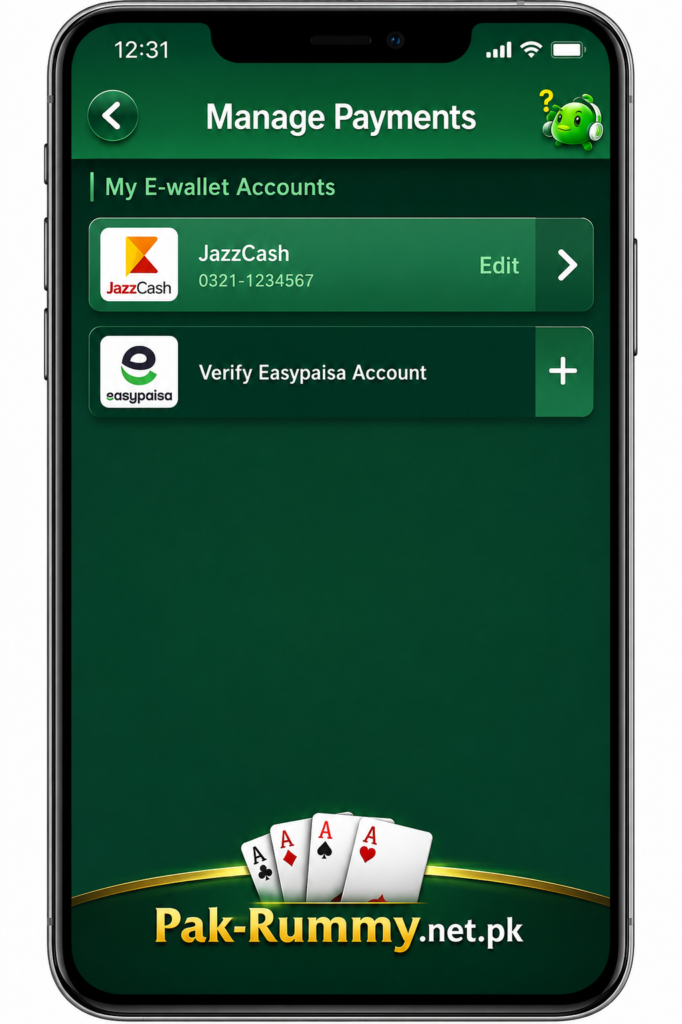
Safety tips: verify the payment number before sending anything, never pay an “unofficial agent,” never share your JazzCash PIN with anyone, keep your payment receipt, and confirm the transaction status afterward.
How to Deposit Using Easypaisa
The process mirrors JazzCash: open the Deposit section, select Easypaisa if it’s available, enter the amount, verify the recipient details shown, complete the payment, save the transaction ID, then return to check your balance.
How to Deposit Through Bank Transfer
If bank transfer is available, select it, then carefully review the account and bank details shown before sending anything. Enter the correct amount, complete the transfer through your own bank’s app or branch, and save the bank transaction or reference number. Bank transfers can take longer to process than mobile wallet payments, so allow extra time before checking whether your balance has updated.
What Is the Minimum Deposit limit on Pakrummy?
Minimum deposit amounts can differ by payment method and can change over time, so this page won’t state a fixed figure as universal. Some third-party sources currently mention a minimum around Rs 200, but other sources describe different structures, treat any number you see elsewhere as something to verify, not as fact. Check the amount displayed on your current deposit screen rather than relying on older articles.
What Is the Maximum Deposit limit?
Maximum deposit amounts may depend on your account, the payment method you’re using, and limits set by the payment provider itself, including daily transaction caps. Check the limit shown on your current deposit page rather than assuming a fixed ceiling applies across all methods and accounts.
Does Pakrummy Charge a Deposit Fee?
Fees can come from several places, the platform itself, the payment provider, your bank, or your digital wallet, and may vary by method or promotion. Always check the final amount shown before you confirm a payment. This page won’t claim deposits are fee-free unless that’s confirmed in the platform’s current official terms.
How Long Does Deposit Take?
Deposits can show different statuses, including instant, processing, pending, completed, or failed. Processing time depends on several factors: the payment provider, your bank, network conditions, account verification status, platform processing, and occasional technical issues. Don’t assume every deposit will be instant.
Why Is My Deposit Pending?
Possible reasons include:
- The payment provider hasn’t confirmed the transaction yet
- The platform hasn’t received confirmation
- A technical delay
- Incorrect payment details
- An account under review
- A bank processing delay
What to do: don’t make another payment right away. Check the payment status, check your wallet balance, review your transaction history, keep your transaction ID, and contact the platform’s current official support channel if the pending status doesn’t clear.
Deposit Not Showing in Balance
If a payment doesn’t appear in your balance:
- Confirm the money was actually deducted from your account.
- Check the transaction status with your payment provider.
- Refresh your Pakrummy account.
- Check your transaction history.
- Verify the payment reference matches what you were given.
- Wait for the stated processing period to pass.
- Contact support if the deposit is still missing afterward.
Information to give support: your username or account ID, the deposit amount, the date and time, the payment method used, the transaction/reference number, and a copy of your payment receipt or screenshot.
Why Did My Deposit Fail?
Possible causes include incorrect payment information, insufficient balance in your wallet or bank account, a payment provider issue, a network problem, an unsupported payment method, a transaction limit being reached, an account restriction, or a temporary technical problem. If a deposit fails, check the reason shown before retrying, and confirm your payment details are correct.
Why Was My Deposit Rejected in Pakrummy APP?
A rejection can happen due to payment verification checks, incorrect details, an unsupported transaction type, a mismatch between the payment account and your Pakrummy account, a security review, or rejection by the payment provider itself. Avoid repeatedly retrying a large payment without first understanding why it was rejected.
What Is a Deposit Transaction ID inside the APP?
A transaction ID (or reference number) is a unique code generated when a payment is processed. It may appear in your payment app, your bank statement, or a confirmation message, and it’s what support uses to investigate a missing or disputed payment.
Example: Transaction ID: XXXXXXXX
This example is fictional, always submit your own actual transaction reference when contacting support.
Money Deducted but Pakrummy Balance Not Updated
If money has left your account but hasn’t appeared in your Pakrummy balance:
- Don’t send another payment immediately.
- Confirm the payment status with your provider.
- Save your receipt.
- Check your account’s transaction history.
- Confirm the recipient and payment details you used were correct.
- Wait for the platform’s stated processing window.
- Contact official support with your evidence.
- Provide proof of the transaction when asked.
Can I Use Another Person’s JazzCash or Easypaisa Account?
Check the platform’s current terms before using a payment account that isn’t your own. Considerations include account ownership, whether the payment name needs to match your registered details, fraud-prevention checks, verification problems, and the possibility of a transaction being rejected. This page won’t state a universal rule either way, the current official terms are the source to check.
Is It Safe to Deposit Money on Pakrummy?
Rather than claim any platform is “100% safe,” it’s more useful to know what to verify for yourself:
- You’re on the correct website or app
- The connection uses HTTPS
- The payment instructions match what’s shown inside your own account
- The payment provider is a secure, recognized service
- You’re not being asked for your password
- You’re not being asked for your wallet PIN
- You’re not being asked for an OTP
- The payment number or account isn’t a suspicious third party
- The app you’re using isn’t a modified APK
- The terms and privacy policy are clearly available
How to Avoid Fake Deposit Links
Scammers often target popular gaming apps directly. Watch out for:
- Fake Facebook pages
- Fake Telegram accounts
- Fake WhatsApp “agents”
- Fake APK download websites
- Fake payment numbers
- Fake “customer support” contacts
- Payment requests made through private messages
- Promises of guaranteed bonuses
Important: never send money simply because someone claims to represent Pakrummy. Always verify payment instructions through the platform’s current official channels, not through a message, comment, or unsolicited call.
Pakrummy Deposit vs Withdrawal
| Feature | Deposit | Withdrawal |
|---|---|---|
| Purpose | Add funds | Remove eligible balance |
| Direction | Payment account → platform | Platform → payment account |
| Starting point | Deposit page | Withdrawal page |
| Verification | May be required | May be required |
| Transaction status | Pending/completed/failed | Pending/completed/failed |
Does Pakrummy Offer Deposit Bonuses?
Promotional offers can change over time and may come with eligibility requirements, wagering or turnover conditions, and expiration dates. Making a deposit doesn’t automatically guarantee a bonus is currently available. See the Pakrummy Bonus Guide for current offer details rather than relying on figures here.
Set a Personal Deposit Budget
Before depositing, it’s worth setting some ground rules for yourself:
- Set a fixed entertainment budget and stick to it.
- Never deposit borrowed money.
- Never use money you need for essentials.
- Don’t chase losses with additional deposits.
- Take regular breaks.
- Stop if gaming starts to feel difficult to control.
- Follow the age and legal requirements that apply where you live.
Some current Pakrummy resources also describe deposit limits and self-exclusion as tools you can use to manage your play, check your account settings for options like these if you want more built-in controls.
Common Pakrummy Deposit Problems
| Problem | Possible Reason | What to Do |
|---|---|---|
| Deposit pending | Provider/platform delay | Check status |
| Money deducted, balance unchanged | Confirmation delay | Save transaction ID |
| Balance not updated | Credit delay | Refresh/check history |
| Payment failed | Provider/network issue | Check status before retrying |
| Wrong amount deposited | User input error | Contact support |
| Payment method unavailable | Method changed | Check current options |
| Deposit rejected | Verification/security issue | Contact support |
| Payment page not loading | Technical issue | Refresh/check connection |
Frequently Asked Questions
Pro Tips Before Deposit in the Game
- Check the current payment methods available in your account.
- Verify recipient and payment details before sending money.
- Confirm the deposit amount before completing payment.
- Keep your transaction ID.
- Never share your PIN or OTP with anyone.
- Don’t use payment links sent through private messages.
- Don’t send money to unofficial “agents.”
- Check your balance after completing a payment.
- Contact official support for any missing transaction.
- Set a personal gaming budget and stick to it.