
Pakrummy Game Withdrawal
This page explains how withdrawing money from a Pakrummy account generally works, how eligible balance is moved out of your wallet, what withdrawal methods you may encounter, how long it can take, and what to check before you request one. Withdrawal rules, limits, and processing times can change over time, so this guide focuses on the process and the precautions worth taking rather than fixed numbers that can go out of date.
One rule matters above all others: Only withdraw to a payment account or bank account that belongs to you, and verify your withdrawal details carefully before submitting a request.
What Is a Pakrummy Withdrawal?
A withdrawal is the process of moving eligible balance out of your Pakrummy wallet and into your own bank account or payment wallet. It’s the reverse of a deposit, which adds funds in. Not all balance in an account is necessarily eligible for withdrawal right away, some platforms distinguish between deposited balance, winnings, and bonus balance, each of which may have different withdrawal conditions. Check your account’s current terms to understand what counts as withdrawable.
How Does Pakrummy Withdrawal Work?
The general flow looks like this:
- Open Pakrummy.
- Log in to your account.
- Open Wallet, Balance, or Withdraw.
- Select a withdrawal method.
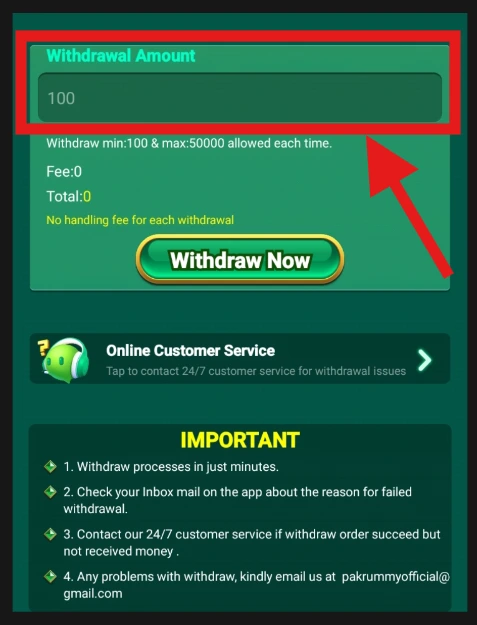
- Enter the amount you want to withdraw.
- Enter or confirm your payment/bank details.
- Complete any identity or account verification requested.
- Submit the withdrawal request.
- Save the transaction/reference number.
- Track the request until it’s completed.
As with deposits, the exact screens, labels, and steps can vary by app version, account status, and withdrawal method, treat this as a general guide rather than an exact script.
Step-by-Step Pakrummy Withdrawal Guide
Step 1: Check Your Eligible Balance
Before requesting a withdrawal, check how much of your balance is actually eligible to withdraw. Some balance types, such as unused bonus funds, may not qualify until certain conditions are met.
Step 2: Log In to Your Account
Use your registered login details. Never share your password or OTP with anyone, and avoid logging in through links sent by unknown sources.
Step 3: Open the Withdrawal Section
This may be labeled Withdraw, Cash Out, Wallet, or Balance, depending on the current app version. Follow whichever label is currently shown.
Step 4: Complete Any Required Verification
Many platforms require identity or account verification before allowing withdrawals, especially for first-time requests or larger amounts. This can include confirming your name, ID details, or linked payment account. Complete this only within the app itself, never through a link sent by someone claiming to help you “speed up” verification.
Step 5: Select a Withdrawal Method
Available methods can vary by account and region. Commonly discussed options include:
- JazzCash
- Easypaisa
- Bank transfer
- Other digital wallets, where supported
Treat any specific method as possibly available rather than guaranteed, confirm what’s actually offered in your account before relying on it.
Step 6: Enter the Withdrawal Amount
Check the minimum and maximum withdrawal amounts displayed on screen before entering a figure, and confirm it matches what you intend to withdraw.
Step 7: Confirm Your Payment Details
Double-check the account number, bank details, or wallet number you’re withdrawing to. An incorrect detail here is one of the most common causes of delayed or failed withdrawals, and in some cases, funds sent to the wrong account can be very difficult to recover.
Step 8: Submit and Track the Request
Once submitted, save any reference number provided, and check your transaction history for the current status of the request.
Available Pakrummy Withdrawal Methods
Withdrawal Method | Availability | Typical Use | What to Check |
|---|---|---|---|
JazzCash | Available | Mobile wallet | Registered number matches your account |
Easypaisa | Available | Mobile wallet | Registered number matches your account |
Other digital wallets | Confirm in your account | Varies | Current availability |
Don’t assume a method is supported just because it appears elsewhere online, check the current withdrawal section of your own account.
Pakrummy Minimum Withdrawal
Minimum withdrawal amounts can differ by method and change over time, so this page won’t state one fixed figure as universal. Check the amount shown on your current withdrawal screen rather than relying on an older article, since minimums are one of the details platforms adjust most often.
Pakrummy Maximum Withdrawal and Daily Limits
Maximum withdrawal amounts may depend on your account status, verification level, and the specific method you’re using, and daily or per-transaction limits may also apply. Check the limits shown on your current withdrawal page rather than assuming a fixed ceiling.
Does Pakrummy Charge a Withdrawal Fee?
Fees can come from the platform, the payment provider, or your bank, and may vary by method or amount. Always check the final payout amount shown before confirming a withdrawal request. This page won’t claim withdrawals are fee-free unless that’s confirmed in the platform’s current official terms.
How Long Does a Pakrummy Withdrawal Take?
Withdrawals can show different statuses, including pending, processing, completed, or failed. Processing time depends on several factors, the withdrawal method, your bank or wallet provider, account verification status, platform review procedures, and occasional technical issues. Don’t assume every withdrawal will be instant, some platforms process withdrawals within a set business-day window rather than immediately.
Why Is My Pakrummy Withdrawal Pending?
Possible reasons include:
- The platform hasn’t finished reviewing the request
- Identity or account verification is incomplete
- A technical delay
- Incorrect or mismatched payment details
- The request falling outside standard processing hours
- A payment-provider or bank delay
What to do: avoid submitting a duplicate request. Check the status in your transaction history, confirm your verification is complete, keep your reference number, and contact the platform’s current official support channel if the pending status doesn’t clear within the stated window.
Why Did My Pakrummy Withdrawal Fail or Get Rejected?
Possible causes include incorrect payment or bank details, a mismatch between your registered name and the payout account, incomplete verification, a payment-provider issue, exceeding a withdrawal limit, or an account under review. If a withdrawal fails or is rejected, check the reason given rather than repeatedly resubmitting the same request, since the underlying issue will likely need to be resolved first.
Why Does Pakrummy Require Verification Before Withdrawal?
Identity and account verification (often called KYC) is a common requirement on platforms that handle real-money withdrawals. It’s generally used to confirm the person requesting the withdrawal is the account owner, to help prevent fraud, and to meet applicable payment or regulatory requirements. Complete this process only through the app’s own official verification flow, never by sending documents through a private message or unofficial link.
What Is a Pakrummy Withdrawal Transaction ID?
A transaction or reference ID is a unique code generated when a withdrawal is processed. It may appear in your account’s transaction history or in a confirmation notification, and it’s what support will ask for if you need to investigate a delayed or missing withdrawal.
Example: Transaction ID: XXXXXXXX
This example is fictional, always provide your own actual reference number when contacting support.
Withdrawal Approved but Money Not Received
If your withdrawal shows as approved or completed but the funds haven’t arrived:
- Don’t submit another withdrawal request for the same amount.
- Check the status with your bank or payment provider directly.
- Confirm the payout account details you provided were correct.
- Check your transaction history for the reference number.
- Wait for the platform’s stated processing window to pass.
- Contact official support with your transaction details if funds still haven’t arrived.
Information to give support: your username or account ID, the withdrawal amount, the date and time of the request, the withdrawal method used, the transaction/reference number, and your account’s verification status.
Pakrummy Withdrawal to the Wrong Account
If you submitted a withdrawal request with incorrect payment or bank details:
- Contact support immediately, don’t wait, since recovering misdirected funds can become harder over time.
- Provide your transaction ID and the correct details as soon as possible.
- Understand that once funds have left the platform to an incorrect account, recovery may depend on your bank or payment provider, not just the platform.
This is one of the strongest reasons to double-check payout details every single time, even if you’ve withdrawn before.
Pakrummy Withdrawal vs Deposit
Feature | Withdrawal | Deposit |
|---|---|---|
Purpose | Remove eligible balance | Add funds |
Direction | Platform → payment account | Payment account → platform |
Starting point | Withdrawal page | Deposit page |
Verification | Often required | May be required |
Transaction status | Pending/completed/failed | Pending/completed/failed |
Related Guides: Pakrummy Deposit, Pakrummy Login
How to Avoid Fake Pakrummy Withdrawal Offers
Scammers often target players around withdrawals specifically, since the promise of “faster” or “guaranteed” payouts is an effective lure. Watch out for:
- Anyone offering to “speed up” your withdrawal for a fee
- Fake support accounts on Facebook, Telegram, or WhatsApp
- Requests to pay a “processing fee” or “tax” before receiving a withdrawal
- Fake links claiming to complete your verification
- Promises of guaranteed or above-normal payouts
- Requests for your password, PIN, or OTP to “process” a withdrawal
Important: a legitimate platform will never ask you to pay money to receive a withdrawal, and will never ask for your password or one-time codes. Verify anything unusual through the platform’s official support channel before acting on it.
Setting Withdrawal Habits That Protect You
A few habits make withdrawal problems far less likely:
- Only withdraw to accounts registered in your own name.
- Double-check payout details every time, even on repeat withdrawals.
- Complete verification early rather than waiting until you need funds urgently.
- Keep records of your transaction IDs and receipts.
- Withdraw periodically rather than letting a large balance build up in one place.
- Treat any message urging you to act quickly on a withdrawal as a red flag.
Common Pakrummy Withdrawal Problems
Problem | Possible Reason | What to Do |
|---|---|---|
Withdrawal pending | Review/processing delay | Check status, wait for stated window |
Verification incomplete | KYC not finished | Complete verification in-app |
Withdrawal failed | Incorrect details or provider issue | Check reason before resubmitting |
Withdrawal rejected | Mismatch or security review | Contact support |
Money not received after approval | Bank/provider delay | Check with bank, then contact support |
Sent to wrong account | User input error | Contact support immediately |
Withdrawal method unavailable | Method changed | Check current options |
Amount below/above limit | Limit not met | Check current min/max on withdrawal page |
Frequently Asked Questions
About This Pakrummy Withdrawal Guide
This page is an independent informational guide. It does not process withdrawals and will never ask you to pay a fee to receive one. Withdrawal methods, limits, and processing times can change, so always check current details directly with the platform before requesting a withdrawal. This site is not responsible for funds sent to incorrect or third-party accounts.
Pakrummy Withdrawal Tips
- Complete identity verification early, before you need funds urgently.
- Double-check your payout account details every time.
- Only withdraw to accounts in your own name.
- Keep your transaction ID and any confirmation you receive.
- Never pay a fee to “unlock” or “speed up” a withdrawal.
- Never share your password, PIN, or OTP with anyone.
- Check your balance and transaction history after every request.
- Contact official support for anything that looks unusual or delayed beyond the stated window.